


byAir: Flight Tracker & Status
4.7150.00 Reviews
App Specs
- Version
- Varies with Device
- Updated On
- License
- Free
- Downloads
- 100,000+
- Developer
- BYAIRAPP S.L.
- Categories
- Travel & Local
- Platform
- Android
Screenshots




 Analysis by AppCompare
I find a flight tracker most useful when it turns a vague wait into a practical next step: leave for the airport later, head toward a gate, or tell someone when to pick me up. byAir: Flight Tracker & Status is aimed at those everyday travel moments, bringing flight information and a map into one place. It is a free travel app from BYAIRAPP S.L., with optional in-app purchases, and its 4.6 average from around 2.2K ratings suggests many users find it worthwhile. I would treat it as a helpful companion, though, rather than a replacement for airline or airport instructions.
What to expect from a flight tracker
The app is for travelers who want to follow a particular flight, and for the friends or family members waiting at either end. Its appeal is straightforward: look up a flight, check its status, and use the available tracking view to get a better sense of its progress. That can be more useful than repeatedly refreshing a general search page, especially when you are coordinating plans with someone else.
It is not the same thing as managing a booking. I would still keep the airline’s confirmation and official updates close at hand for check-in, boarding instructions, and changes that require action. A tracker helps answer “where is the flight?” and “what is its current status?”; the airline remains the better authority for what you personally need to do next.
Getting from install to a useful result
For a first-time user, the simplest route is to have the flight number ready before opening the app. If you do not have it, the original review describes searching by airline and departure date as another route. Once you have found the right flight, check that the route and date match your plans before relying on the result; flights can share similar identifiers, and a small mismatch can send you down the wrong track.
Then choose the detail that answers your immediate question. If you are meeting someone, the estimated arrival and current status matter more than a close look at the map. If you are curious about the journey itself, the map can make the route easier to follow. This small habit—starting with the decision you need to make—keeps a detailed tracker from becoming a screen full of information without a clear purpose.
Who will get the most from it
I can see this being most useful for people who travel occasionally and want a quick way to check a flight, as well as people who regularly collect passengers. It can also suit aviation enthusiasts who enjoy watching a route progress and looking at flight details. With over 100,000 installs, it has found an audience beyond a handful of early users; the app is rated for Everyone, so its subject matter is accessible to a broad range of travelers.
It is less compelling if you only need a boarding pass, booking changes, or an airline’s own check-in process. Those tasks belong in the airline app. Likewise, if you prefer to receive only essential messages, a tracker may feel like one more travel tool to check. I would install it when following a flight has a clear purpose, not simply because every trip needs another app.
Worth Reading Before You Choose

Flipboard Shows What News Apps Must Do Beyond the Feed

Switching to Android Auto Means Rethinking Your Driving Routine

Google Calendar Makes a Crowded Week Easier to Manage

Ludo King Makes the Most of the Minutes Between Plans

Baby Panda World Brings Quick Play to Modern Phones, but Its Game Library Feels Busy

ESPN’s Live Game View Makes Following Close Games Easier
Everyday use: coordinating a pickup
Imagine a friend is flying in while you are still at home. Rather than setting off based only on the original arrival time, you can look up the flight and check its current status. If it is delayed, you may be able to avoid an unnecessarily long wait at the terminal; if it appears to be progressing as expected, you have a more informed starting point for the drive.
For a smoother handoff, share the practical update in plain language—such as whether the flight is still in the air or whether the arrival time has shifted—rather than asking your friend to interpret every detail on your screen. The app can inform your timing, but airport procedures, baggage collection, and the walk to the pickup area still affect when someone is actually ready to leave.
Easy Peasy Setup
First things first, downloading and setting up byAir: Flight Tracker & Status is a breeze. Available on both Android and iOS, you can snag it from your respective app store, and you’re good to go. The user interface is clean and intuitive, so you won't need a manual to find your way around.
Once installed, the app greets you with a welcoming dashboard where you can enter your flight number or even just the airline and departure date. Within seconds, the app fetches all the relevant details. It’s as simple as pie, and I found myself navigating through the options without a hitch.
Features That Fly High
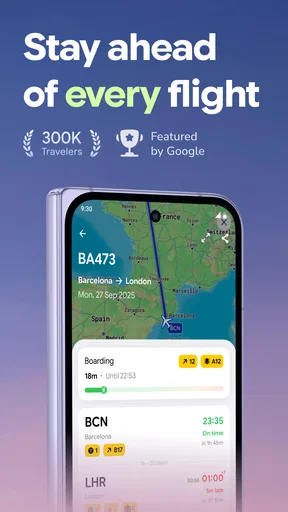
The app’s standout feature is its real-time flight tracking. You can watch your flight or any other flight you’re interested in as it makes its journey across the skies. The map view is detailed, and you can zoom in to get a closer look at the flight path. It’s like a mini flight simulator, minus the turbulence!
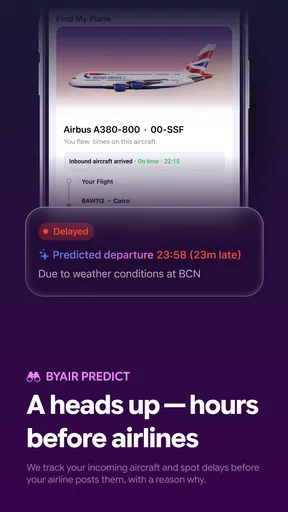
Another cool feature is the push notifications. The app keeps you in the loop with updates about any delays, gate changes, or even cancellations. It’s like having a savvy friend at the airport who knows all the gossip and keeps you informed.
For those who love details, the app also offers in-depth flight stats, including altitude, speed, and estimated arrival time. You’ll feel like an aviation expert in no time.
Travel Smart with Extra Perks
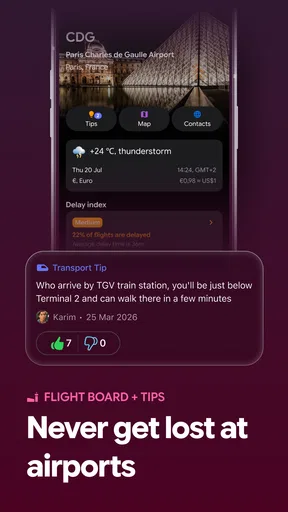
Beyond just tracking flights, byAir: Flight Tracker & Status offers a few nifty extras that make it a handy travel companion. You can access terminal maps for major airports, which is a lifesaver when you’re trying to find the nearest coffee shop or the elusive gate B22. Plus, the weather updates for both departure and arrival locations help you plan your wardrobe accordingly.
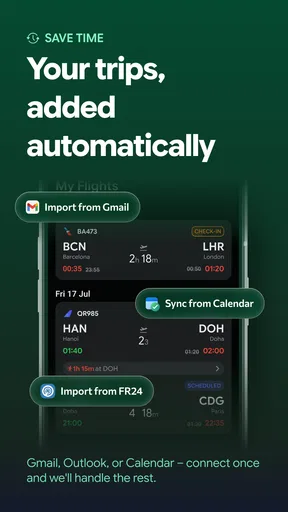
If you’re a frequent flyer or a travel enthusiast, this app can also store your travel history. It’s fun to look back and see how many miles you’ve covered. Talk about a digital travel diary!
Using the details without overreading them
Flight maps and statistics are engaging, but they are most useful when treated as context rather than a promise. An estimated arrival time can shift as a journey develops, and a map is not a substitute for an airline’s boarding information. I would check the tracker when making a timing decision, then verify anything that affects a connection, gate, or pickup plan through the relevant airline or airport channel.
A practical tip is to avoid focusing on every available number. For someone waiting at arrivals, the status and estimated arrival are usually enough; altitude and speed are more interesting when following the trip itself. Separating “information I need to act” from “information I am curious about” makes the app easier to use, particularly in a busy terminal.
Notifications, alternatives, and trade-offs
Notifications can save repeated manual checks when a flight is changing, but they are only helpful if they fit the way you travel. I would use them for a flight I am actively following, then keep the airline’s own messages enabled for anything that affects my booking. If you prefer not to receive travel alerts, you can still use a tracker as a check-in point when you choose; the trade-off is that you must remember to open it yourself.
Compared with searching for a flight on the web, a dedicated tracker can make repeated checks feel more convenient and put the route view alongside the status. Compared with an airline app, it is more focused on following flights than handling a passenger’s booking. Neither approach replaces the other: I would use byAir for situational awareness and the airline app for account-specific tasks. If you only fly rarely and already get everything you need from your carrier, adding another app may not be worth it.
Price, support, and sensible expectations
The app is free to download, while optional in-app purchases are listed at prices ranging from $4.99 to $199.99 per item. That wide range makes it sensible to explore the free experience first and consider a purchase only if you understand what it adds and expect to use it. I would not assume that a paid option is necessary just to check a flight; decide based on the features presented in the app at the time you use it.
byAir was released on October 26, 2023, and its 87 written reviews offer another perspective alongside the average rating. Ratings can help set expectations, but they cannot guarantee that every flight lookup or update will fit your particular trip. For an important connection or time-sensitive pickup, keeping an official source as a backup is a sensible habit rather than a criticism of any single tracker.
Final Thoughts
Overall, byAir: Flight Tracker & Status is a must-have for anyone who likes to stay in the know about their flights. Whether you’re a seasoned traveler or just someone picking up a friend from the airport, this app has got your back. It’s user-friendly, packed with features, and, most importantly, it keeps you informed every step of the way.
So next time you’re heading to the airport, do yourself a favor and download this app. It might just save you from a lot of headaches and help you travel like a pro. Safe travels!
Pros
- Real-time flight updates enhance travel planning.
- Intuitive interface for easy navigation.
- Customizable alerts for flight changes.
- Offline mode available for saved flights.
- Supports multiple airlines globally.
Cons
- May drain battery with constant updates.
- Requires internet for real-time tracking.
- Limited free features without subscription.
- Occasional delays in flight data updates.
- Ads can be intrusive in the free version.
FAQs for byAir: Flight Tracker & Status
What features does byAir: Flight Tracker & Status offer?
byAir: Flight Tracker & Status provides real-time flight tracking, gate updates, and status alerts. It also includes features like airport maps, flight history, and a convenient search function for quick information retrieval. Users can set up notifications for delays or changes and access weather forecasts for their destination.
Is byAir: Flight Tracker & Status available for both Android and iOS?
Yes, byAir: Flight Tracker & Status is available for download on both Android and iOS platforms. Users can easily find the app on the Google Play Store for Android devices and the App Store for iOS devices, ensuring a wide range of compatibility across different smartphones and tablets.
Does byAir require an internet connection to work?
Yes, byAir: Flight Tracker & Status requires an internet connection to provide real-time updates and notifications. While some information may be cached for offline access, features like live tracking and status changes need an active connection to function optimally.
Are there any in-app purchases or subscriptions in byAir?
byAir offers a free version with basic features. However, there are optional in-app purchases for premium features, such as ad-free experience, advanced notifications, and additional customization options. Users can choose a subscription plan that best fits their needs, providing flexibility depending on their travel frequency.
How accurate is the flight tracking information in byAir?
byAir: Flight Tracker & Status sources its data from reliable aviation databases and provides highly accurate and up-to-date information. However, there might be occasional discrepancies due to unforeseen circumstances like technical issues or sudden changes by airlines, but these are typically minimal.


